Showing posts with label ECU Programming Tool. Show all posts

Thursday, June 8, 2017

Update Ktag V7.003 to Ktag V7.020: new encrypted cars & 100+ ECUs

obdexpress.co.uk rolls out newest 2017 Ktag Master FW V7.020 SW V2.23 ECU programming tool, it adds many newencrypted new car models works I.E Toyota 76FXXX, PSA 17.4.4, Ford E83, VW 17.5.5 (1766), Mercedes-Benz 276ECU, Toyota 76F, etc. as well as 100+ ECU types.

So if you had the old firmware Ktag KTM100 7.003 and want to update to firmware 7.020, you could ship the full package back to rework (Cost 140USD, not including shipping)
Ktag Master FW V7.20 for sale: 425 USD (389EURO)
ktag-v7.020-ecu-programming-tool-without-tokens-limitation-3
How to install Ktag Master FW V7.20?
Hardware version: V7.020
Software version: V2.23
– XP works fine, try on WIN7 8 10 at your own risk
– How to install ksuite v2.33( applies for ksuite v2.23):
During installation, you are able to choose language: English, Italian, Portuguese

Using tips:
Tip 1: During operation, disable the internet connection; otherwise the ktag software may get damaged. (There are warning mark at the back of machine)

Tip 2: You may notice Ktag master V7.020 connection instructions is words not pictures, actually, you will find some words are blue or red color with underline, click them and you will see the connection instructions has pictures. Here two pictures for example.
Ktag Master V7.020 diagram-01 Ktag Master V7.020 diagram-02


Ktag Master V7.020 has no tokens limit.
It is easy to reset tokens:
When you run out of the tokens, plug the USB cable into the computer and the red indicator flashes, press the Reset button, wait until the indicator flashes off, unplug the USB cable and plug back to the computer, OK now you have another 30 tokens.
ktm100-ktag-reset token
ktag master V7.020 outlook is same as Ktag V7.003:
ktag-v7.020-ecu-programming-tool-without-tokens-limitation-1 ktag-v7.020-ecu-programming-tool-without-tokens-limitation-1 ktag-v7.020-ecu-programming-tool-without-tokens-limitation-4


Tuesday, April 12, 2016

2014 UPA and XPROG-M differ in chip tuning

Here’s the tested result of tuning chip differences between UPA-USB and Xprog-m ECU programmer. UPA USB chip tuning is good in doing MOTOROLA chip while X-prog m supports on-board and in-circuit programming of better following chips including Motorola 68HC05, 68HC08, 68HC11, 68HC(S)12 family MCU's, Texas Instruments TMS370/TMS374 family MCU's and serial EEPROM's.
UPA USB Programmer Support the following chips:..
STMicroelectronics ST62*: ST6240, ST6245, ST6249
NSC CR16*: CR16HCS5(9), CR16MCS5(9), CR16MES5(9), CR16MFS5(9), CR16MCT5/9, CR16HCT5/9
Motorola HC05*: MC68HC05B6, MC68HC05B8, MC68HC05B16, MC68HC705B16, MC68HC05B32, MC68HC05E6, MC68HC705E6, MC68HC05H12, MC68HC05L28, MC68HC05P3, MC68HC705P3*,MC68HC05X16, MC68HC05X32
Motorola HC08*: MC68HC08AS20, MC68HC08AS32, MC68HC08AS60, MC68HC08AZ32, MC68HC(9)08AZ32A, MC68HC908AZ60, MC68HC908AZ60A
Motorola HC11*: MC68HC11A1, MC68HC11A8, MC68HC11E9, MC68HC11EA9, MC68HC11E20, MC68HC11F1, MC68HC11K4, MC68HC11KA2, MC68HC11KA4, MC68HC11KG4, MC68HC11KS2, MC68HC11KS8, MC68HC11L6, MC68HC11P2, MC68HC11PA8, MC68HC11PH8
The XPROG-m supports in-circuit or on-board programming of:
Motorola 68HC05 , 68HC08, 68HC11, 68HC(S)12 , HC912, MC9S12, MC9S12X
Texas Instruments TMS370 , MPC5xx, ST10Fxx, ATmega family MCU's
serial EEPROM's

XPROG-m programmer is fully upward-compatible hardware with XPROG programmer and have many additional features.

All supported devices are divided into "Software authorization" licenses. You can obtain authorization license only for these devices you are interested in.

NOTE:
UPA : Cannot read secured mcu / Xprog-m: Can read secured mcu 
UPA : must have knowledge to use with processor / Xprog-M: Must be good in soldering / desoldering

New Genius Ktouch vs. Kess V2 ECU Tuning Tool

Hand-held New Genius & Flash Point has been released for decades. Here, obd2express list the main differences of the two ECU chip tuning tools- hand-held kess v2 and pc-based kess v2.
Product Name New Genius/ Ktouch Best Quality Kess V2 
Picture New-Genius-Flash-Point KESS-V2-BEST-QUALITY
Language English, Italian, German, French , Spanish, Portuguese, Hungarian English, German, Spanish, Italian, Portuguese, French
Software -- V2.15
Hardware V5.05 V4.036
Tokens No Tokens Limitation,30 Token s come with device by default, you can press the tokens reset  button on the back of hardware to get new Tokens No Tokens Limitation, there is renew  button on the main unit. This button is used to charge tokens. Once your tokens run over, just click this button, then tokens will go back to 30 tokens.
Update via hardware via hardware
Support Protocols CAN-BUS, KWP and J1850 protocols Line, CAN, EDC17 and MED17 and Ford J1850
Vehicle coverage Car, Bikes, LCV Support more new vehicle than Kess V2 New Genius vehicle list Car and Bike
PC Hand-held, no need PC; software is inside the machine already directly to use PC is needed when modify the data PC-based ECU Programmer; you need install the software by yourself  
OS Windows XP system most WIN7 and XP systems
Method Read and Write ECU via OBD2 directly Read and Write ECU via OBD2 directly
Conclusion 1) Hand-held KESS V2 version- KTouch, more easily and convenient to use 2) Adds more new ECUs than KESS V2

How to solve Kess V2 Bootloader adapter problems

Find a solution to fix Kess v2 clone bootloader adapter problems. Just put it here for sharing.

Device:
Kess v2 with ksuite 4.036 (China clone)

Symptom:
I am having problems with my bootloader adapter for Kess v2. Kess is reworked to 4.036 and works with OBD cable. I tried to use bootloader adapter and cable, but failed to read any ecu. I tried to connect EDC17CP14 (on the bench and without boot pin- obd mode on the bench), no luck with Kess (but my reworked Galletto worked with similar wiring ID + read OK).
I already checked the wiring in the cable connector- fixed some wires, but still nothing.
I think there may be something wrong in the bootloader unit.

4 steps to solve bootloader adapter problems:
Step 1- fixed the wiring
i fixed the wiring in the connector that goes into the bootloader module like in the picture (Ktag has the same) 4 wires were wrong in my connector.

Step 2- resoldered the mosfet
And I resoldered the mosfet (in the middle of the module- near the middle LED).

Step 3- read ECU without opening
I then got the power to the ecu. But it didnt read it, probably because I didn’t connect the boot pin (that needs to be soldered on the ecu pcb). I tried to read it without opening, because I borrowed the ecu.
Step 4- opened the ECU to read
So I finally got the time to test my bootloader module with all wiring (boot cable attached). Once I opened the ECU (edc17cp14) and connected the boot pin, I was able to succesfully Id and read the ECU.
Worked like a charm!

The main problem was the soldering of the mosfet transistor in the middle of bootloader pcb, and I remowed the extra wire that was on the other side of the pcb.

Hope this helps those with Kess V2 unit from China

(NOTE: This is a cutomer solution; please try and responsible for what you will do)

Wednesday, January 27, 2016

Solution of KESS V2 Renew Error

Problem:
Renew Kess V2 Error
Solution:
Please rename the tokens file,
Change the name token1.tok to token3.tok or token5.tok.
Then copy the token file to the folder of the tokens file.
Make sure it exist only one token.tok file in the folder.


Kess V2 Using Tips
1. No internet and must follow the steps from our video (Once connected to internet will destroy  the hardware and can not repair in your place, you need to send back for repairing.)
2. No update and no anti-virus software on computer
3. Dont change CPU
4. Can not programm CPU
5. Suggest using our XP system. If you want test other system,no internet also.Or be responsible by yourself.

Monday, January 11, 2016

Kess V2 V2.13 Firmware 4.036 Reset Tokens Guide

Kess V2 V2.13 Firmware V4.036 ECU programming tool token reset error solution and add token instruction are provided in the text below.

Problem before entering:
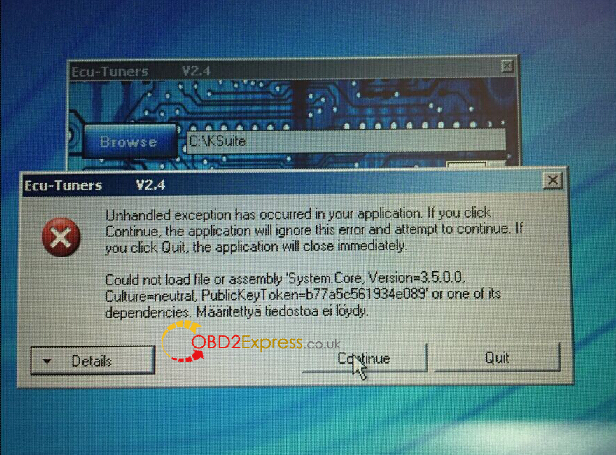
One of the KESS V2 V2.13 FW V4.036 users tried to add token himself when he has only 9 tokens left. But the Kess reported and error:
“Ecu-Tunners V2.4

Unhandled exception has occurred in your application. If you are click Continue…the application will close immediately. “”

Then the Kess v2 ksuite V2.13 software was downgraded to V2.08.
Error screenshots token below:


Kess v2 firmware V4.036 ECU tuning kit comes with no token limitation. Here is the step-by-step token reset procedure.

Free download token reset video, Ksuite-tokens.zip and Kessv2-TF.zip
https://mega.co.nz/#fm/25UkmDoY

Detail instructions:
Disclaimer: Better to refer to the video instruction first.

How to connect Kess V2 programmer to reset tokens?
Follow connection picture below:
DO NOT connect KESS V2 device with vehicle.
Please disable both local area connection and wireless network connection, otherwise KESS v2 ECU programmer device the will damaged.
Well installed KESS V2 Ksuite V2.13 software
Open My Computer>>Device Manager>>Universal Serial Bus Controller>> USB Device to check if the KESS V2 Ksuite v2.13 is well installed
Unzip Tool.zip file and copy all 3 files to the desktop
Copy and cut KSuite-tokens.zip file to Local Disk C://, unzip the file
Delete “Tool” folder and zip.file on the desktop

Open Ksuite software on the desktop then close it
Rename “Token1tok” on the desktop as “Token47tok”
Prepare a 2GB TF Card, format the card
Copy Kessv2-2.13-TF.zip file and copy files to the new TF card
Delete “Kessv2-2.13-TF.zip” file on the desktop
Replace the old TF with new one
Rename “Token47tok” on the desktop as “Token48tok”
Copy the “Token48tok” to “Tokens” folder
Delete KSuite-tokens folder on Disk C://
Unzip the KSuite-tokens.zip file again
Open the unzipped folder, rename “K10033818.CFG” to “139K10033818.CFG”
Copy the file to “KSuite” >> “Update” folder
Run “K10033818 K2-TR ECU TUNERS”;
Click “OK” to continue;
Browse the folder to C:\\KSuite tokens\KSuite;
Press “Reset Tokens Count” button
Press “OK” to reset tokens
Open Ksuite software and wait for loading, then close the window

K-TAG KTM100 V2.13 firmware V7.003 Connection error E000079 (Fixed)

KTAG K-TAG KTM100 V2.13 firmware V7.003 ECU Programming Tool Master Version connection error (E000079) solution is provided below.

Problem:
After well installed the Ktag KTM100 V2.13 software on Win XP laptop and tried to select ECU to read and write. The software displays no ECU options under “Option” tab (all options are in gray). Meanwhile, the KTM100 software reported an error:
“Initialization…
Interface connected…
Firmware Version: v7.3 build:0000
Error 【E000079】Customer Code Invalid”
Possible reason & Solution:
Obd2express.co.uk engineer has worked out the solution and verified working by our customer.

Possible causes:
1.Internet connection have not been disabled
2.Ktag driver is not well installed
3.There is no power supply fed to the Ktag ecu programmer
4.TF card and Shrapnel has poor connection

Solution:
1.Please disable internet/network connection before installing software. THIS IS VERY IMPORTANT!!!

2. Make sure Ktag KTM100 driver is well installed.
Open My Computer>>Manager>>Device Manager>>Universal Serial Bus controllers>>DimSport-New Trasdata Device to check the good communication between K-tag and computer.

Software driver installation video to refer:
http://www.dailymotion.com/video/x2vd2al_fw-v7-003-ktag-k-tag-ktm100-v2-13-software-installation-video-obd2express-co-uk_auto?start=10

3.Make sure there is a power supply fed to the Ktag ECU tuning kit.

4.If all the previous conditions are no problem, then the problem lies on the TF card. Make the shrapnel firmly attached to the TF card.

In our customer’s case, the TF card is loose connection. He higher the shrapnel to make it firmly attached to the TF card, then the problem was solved.

K-TAG V2.13 KTM100 V7.003 failed to read EDC17 (fixed)

Here is the solution to KTAG K-TAG V2.13 KTM100 7.003 ECU Programming Tool Master Version “Error (E011024) CAN Communication error” when reading EDC17.

Problem:
KTAG KTM100 software reported CAN Communication error when read EDC17. Then another error displayed “This application has failed to start because the application configuration is incorrect. Reinstalling the application may fix this problem.” So he disconnect the current running FGTECH Galletto V54 ECU tuning software. Tried to uninstall KTM100 and communicate with other car models, still the same error displayed. (error screenshots)


Possible causes:
1.Anti-virus software or current running software
2.Operating system

Solution:
Ktag KTM100 7.003 does read EDC17. See “Reference”. But make sure you’ve done following settings.

1. Disconnect anti-virus software and other current existing/running software programs (fgtech etc)

2. Download our Windows XP (Win XP SP3 professional) operating system
http://www.chinaautodiag.com/download/ghost-windows-xp-professional-sp3-free-download.zip

How to install Win XP SP3?
http://www.chinaautodiag.com/download/How-to-install-ghost-windows-xp-professional-sp3.pdf

3. Disable both local and wireless network connection

4.Reinstall KTM100 V2.13 software and read ECU follow video instruction.
http://www.dailymotion.com/video/x2vd2al_fw-v7-003-ktag-k-tag-ktm100-v2-13-software-installation-video-obd2express-co-uk_auto

Reference:
KTAG KTM100 is the best K-tag ECU programmer version to read EDC 17.

KTM 2.13 adds more ECUs than other ordinary Ksuite software:
BMW:
EDC17C41 TC1797
       EDC17CP45 TC1797
       EDC17C50 TC1797
EDC17C56 TC1797
EDC17CP49 TC1797
MEVD172G TC1797
MEDV1725 TC1797
Public
EDC17C46 TC1797
       EDC17C44 TC1797
       MED17.1.6 TC1797
       MED17.5.21 TC1782
       MED17.5.5 TC1767
       ME17.5.24 TC1724
       MED17.1.1 TC1797
Volvo
       EDC17CP48 TC1797
 
Jaguar
MED17.8.31 TC1797
 
Opel
EDC17C59 TC1767
 
Run quickly
      EDC17C46 TC1797
      MED17.7.2 TC1797
      EDC17CP57 TC1793
      EDC17C66 TC1793
  Ford
      EDC17C10 TC1797
 
Ferrari
      MED17.3.4 TC1797
 
McLaren
      ME17.8.3 TC1797
 
Renault
      ME17.9.20 TC1782

You can also watch the video example (dailymotion video above) on installing KTM100 software on Win XP and programming VW Golf 6 2.0L 1.6V TDI EDC17 CP14 ECU.